<?xml version="1.0" encoding="utf-8"?>
<feed xmlns="http://www.w3.org/2005/Atom">

  <title><![CDATA[Nice R Code]]></title>
  <link href="http://nicercode.github.io/atom.xml" rel="self"/>
  <link href="http://nicercode.github.io/"/>
  <updated>2016-09-16T12:20:04+10:00</updated>
  <id>http://nicercode.github.io/</id>
  <author>
    <name><![CDATA[Rich FitzJohn & Daniel Falster]]></name>
    
  </author>
  <generator uri="http://octopress.org/">Octopress</generator>

  
  <entry>
    <title type="html"><![CDATA[Figure functions]]></title>
    <link href="http://nicercode.github.io/blog/2013-07-09-figure-functions/"/>
    <updated>2013-07-09T16:41:00+10:00</updated>
    <id>http://nicercode.github.io/blog/figure-functions</id>
    <content type="html"><![CDATA[<p>Transitioning from an interactive plot in R to a publication-ready
plot can create a messy script file with lots of statements and use of
global variables.  This post outlines an approach that I have used to
simplify the process and keeps code readable.</p>

<!-- more -->

<p>The usual way of plotting to a file is to open a plotting device (such
as <code>pdf</code> or <code>png</code>) run a series of commands that generate plotting
output, and then close the device with <code>dev.off()</code>.  However, the way
that most plots are developed is purely interactively.  So you start
with:</p>

<div class="bogus-wrapper"><notextile><figure class="code"><div class="highlight"><table><tr><td class="gutter"><pre class="line-numbers"><span class="line-number">1</span>
<span class="line-number">2</span>
<span class="line-number">3</span>
<span class="line-number">4</span>
<span class="line-number">5</span>
<span class="line-number">6</span>
<span class="line-number">7</span>
<span class="line-number">8</span>
<span class="line-number">9</span>
</pre></td><td class="code"><pre><code class=""><span class="line">set.seed(10)
</span><span class="line">x &lt;- runif(100)
</span><span class="line">y &lt;- rnorm(100, x)
</span><span class="line">par(mar=c(4.1, 4.1, .5, .5))
</span><span class="line">plot(y ~ x, las=1)
</span><span class="line">fit &lt;- lm(y ~ x)
</span><span class="line">abline(fit, col="red")
</span><span class="line">legend("topleft", c("Data", "Trend"),
</span><span class="line">       pch=c(1, NA), lty=c(NA, 1), col=c("black", "red"), bty="n")</span></code></pre></td></tr></table></div></figure></notextile></div>

<p>Then to convert this into a figure for publication we copy and paste
this between the device commands:</p>

<div class="bogus-wrapper"><notextile><figure class="code"><div class="highlight"><table><tr><td class="gutter"><pre class="line-numbers"><span class="line-number">1</span>
<span class="line-number">2</span>
<span class="line-number">3</span>
</pre></td><td class="code"><pre><code class=""><span class="line">pdf("my-plot.pdf", width=6, height=4)
</span><span class="line">  # ...pasted commands from before
</span><span class="line">dev.off()</span></code></pre></td></tr></table></div></figure></notextile></div>

<p>This leads to bits of code that often look like this:</p>

<div class="bogus-wrapper"><notextile><figure class="code"><div class="highlight"><table><tr><td class="gutter"><pre class="line-numbers"><span class="line-number">1</span>
<span class="line-number">2</span>
<span class="line-number">3</span>
<span class="line-number">4</span>
<span class="line-number">5</span>
<span class="line-number">6</span>
<span class="line-number">7</span>
<span class="line-number">8</span>
<span class="line-number">9</span>
<span class="line-number">10</span>
<span class="line-number">11</span>
</pre></td><td class="code"><pre><code class=""><span class="line"># pdf("my-plot.pdf", width=6, height=4) # uncomment to make plot
</span><span class="line">set.seed(10)
</span><span class="line">x &lt;- runif(100)
</span><span class="line">y &lt;- rnorm(100, x)
</span><span class="line">par(mar=c(4.1, 4.1, .5, .5))
</span><span class="line">plot(y ~ x, las=1)
</span><span class="line">fit &lt;- lm(y ~ x)
</span><span class="line">abline(fit, col="red")
</span><span class="line">legend("topleft", c("Data", "Trend"),
</span><span class="line">       pch=c(1, NA), lty=c(NA, 1), col=c("black", "red"), bty="n")
</span><span class="line"># dev.off() # uncomment to make plot</span></code></pre></td></tr></table></div></figure></notextile></div>

<p>which is all pretty ugly.  On top of that, we’re often making a bunch
of variables that are global but are really only useful in the context
of the figure (in this case the <code>fit</code> object that contains the trend
line).  An arguably worse solution would be simply to duplicate the
plotting bits of code.</p>

<h2 id="a-partial-solution">A partial solution:</h2>

<p>The solution that I usually use is to make a function that generates
the figure.</p>

<div class="bogus-wrapper"><notextile><figure class="code"><div class="highlight"><table><tr><td class="gutter"><pre class="line-numbers"><span class="line-number">1</span>
<span class="line-number">2</span>
<span class="line-number">3</span>
<span class="line-number">4</span>
<span class="line-number">5</span>
<span class="line-number">6</span>
<span class="line-number">7</span>
<span class="line-number">8</span>
<span class="line-number">9</span>
<span class="line-number">10</span>
<span class="line-number">11</span>
</pre></td><td class="code"><pre><code class=""><span class="line">fig.trend &lt;- function() {
</span><span class="line">  set.seed(10)
</span><span class="line">  x &lt;- runif(100)
</span><span class="line">  y &lt;- rnorm(100, x)
</span><span class="line">  par(mar=c(4.1, 4.1, .5, .5))
</span><span class="line">  plot(y ~ x, las=1)
</span><span class="line">  fit &lt;- lm(y ~ x)
</span><span class="line">  abline(fit, col="red")
</span><span class="line">  legend("topleft", c("Data", "Trend"),
</span><span class="line">         pch=c(1, NA), lty=c(NA, 1), col=c("black", "red"), bty="n")
</span><span class="line">}</span></code></pre></td></tr></table></div></figure></notextile></div>

<p>Then you can easily see the figure</p>

<div class="bogus-wrapper"><notextile><figure class="code"><div class="highlight"><table><tr><td class="gutter"><pre class="line-numbers"><span class="line-number">1</span>
</pre></td><td class="code"><pre><code class=""><span class="line">fig.trend() # generates figure</span></code></pre></td></tr></table></div></figure></notextile></div>

<p>or</p>

<div class="bogus-wrapper"><notextile><figure class="code"><div class="highlight"><table><tr><td class="gutter"><pre class="line-numbers"><span class="line-number">1</span>
<span class="line-number">2</span>
</pre></td><td class="code"><pre><code class=""><span class="line">source("R/figures.R") # refresh file that defines fig.trend
</span><span class="line">fig.trend()</span></code></pre></td></tr></table></div></figure></notextile></div>

<p>and you can easily generate plots:</p>

<div class="bogus-wrapper"><notextile><figure class="code"><div class="highlight"><table><tr><td class="gutter"><pre class="line-numbers"><span class="line-number">1</span>
<span class="line-number">2</span>
<span class="line-number">3</span>
</pre></td><td class="code"><pre><code class=""><span class="line">pdf("figs/trend.pdf", width=6, height=8)
</span><span class="line">fig.trend()
</span><span class="line">dev.off()</span></code></pre></td></tr></table></div></figure></notextile></div>

<p>However, this still gets a bit unweildly when you have a large number
of figures to make (especially for talks where you might make 20 or 30
figures).</p>

<div class="bogus-wrapper"><notextile><figure class="code"><div class="highlight"><table><tr><td class="gutter"><pre class="line-numbers"><span class="line-number">1</span>
<span class="line-number">2</span>
<span class="line-number">3</span>
<span class="line-number">4</span>
<span class="line-number">5</span>
<span class="line-number">6</span>
<span class="line-number">7</span>
</pre></td><td class="code"><pre><code class=""><span class="line">pdf("figs/trend.pdf", width=6, height=4)
</span><span class="line">fig.trend()
</span><span class="line">dev.off()
</span><span class="line">
</span><span class="line">pdf("figs/other.pdf", width=6, height=4)
</span><span class="line">fig.other()
</span><span class="line">dev.off()</span></code></pre></td></tr></table></div></figure></notextile></div>

<h2 id="a-full-solution">A full solution</h2>

<p>The solution I use here is a little function called <code>to.pdf</code>:</p>

<div class="bogus-wrapper"><notextile><figure class="code"><div class="highlight"><table><tr><td class="gutter"><pre class="line-numbers"><span class="line-number">1</span>
<span class="line-number">2</span>
<span class="line-number">3</span>
<span class="line-number">4</span>
<span class="line-number">5</span>
<span class="line-number">6</span>
<span class="line-number">7</span>
</pre></td><td class="code"><pre><code class=""><span class="line">to.pdf &lt;- function(expr, filename, ..., verbose=TRUE) {
</span><span class="line">  if ( verbose )
</span><span class="line">    cat(sprintf("Creating %s\n", filename))
</span><span class="line">  pdf(filename, ...)
</span><span class="line">  on.exit(dev.off())
</span><span class="line">  eval.parent(substitute(expr))
</span><span class="line">}</span></code></pre></td></tr></table></div></figure></notextile></div>

<p>Which can be used like so:</p>

<div class="bogus-wrapper"><notextile><figure class="code"><div class="highlight"><table><tr><td class="gutter"><pre class="line-numbers"><span class="line-number">1</span>
<span class="line-number">2</span>
</pre></td><td class="code"><pre><code class=""><span class="line">to.pdf(fig.trend(), "figs/trend.pdf", width=6, height=4)
</span><span class="line">to.pdf(fig.other(), "figs/other.pdf", width=6, height=4)</span></code></pre></td></tr></table></div></figure></notextile></div>

<p>A couple of nice things about this approach:</p>

<ul>
  <li>It becomes much easier to read and compare the parameters to the
plotting device (width, height, etc).</li>
  <li>We’re reduced things from 6 repetitive lines to 2 that capture our
intent better.</li>
  <li>The to.pdf function demands that you put the code for your figure in a function.</li>
  <li>Using functions, rather than statements in the global environment,
discourages dependency on global variables.  This in turn helps
identify reusable chunks of code.</li>
  <li>Arguments are all passed to <code>pdf</code> via <code>...</code>, so we don’t need to
duplicate <code>pdf</code>’s argument list in our function.</li>
  <li>The <code>on.exit</code> call ensures that the device is always closed, even if
the figure function fails.</li>
</ul>

<p>For talks, I often build up figures piece-by-piece.  This can be done
like so (for a two-part figure)</p>

<div class="bogus-wrapper"><notextile><figure class="code"><div class="highlight"><table><tr><td class="gutter"><pre class="line-numbers"><span class="line-number">1</span>
<span class="line-number">2</span>
<span class="line-number">3</span>
<span class="line-number">4</span>
<span class="line-number">5</span>
<span class="line-number">6</span>
<span class="line-number">7</span>
<span class="line-number">8</span>
<span class="line-number">9</span>
<span class="line-number">10</span>
<span class="line-number">11</span>
<span class="line-number">12</span>
<span class="line-number">13</span>
</pre></td><td class="code"><pre><code class=""><span class="line">fig.progressive &lt;- function(with.trend=FALSE) {
</span><span class="line">  set.seed(10)
</span><span class="line">  x &lt;- runif(100)
</span><span class="line">  y &lt;- rnorm(100, x)
</span><span class="line">  par(mar=c(4.1, 4.1, .5, .5))
</span><span class="line">  plot(y ~ x, las=1)
</span><span class="line">  if ( with.trend ) {
</span><span class="line">    fit &lt;- lm(y ~ x)
</span><span class="line">    abline(fit, col="red")
</span><span class="line">    legend("topleft", c("Data", "Trend"),
</span><span class="line">           pch=c(1, NA), lty=c(NA, 1), col=c("black", "red"), bty="n")
</span><span class="line">  }
</span><span class="line">}</span></code></pre></td></tr></table></div></figure></notextile></div>

<p>Now – if run with as</p>

<div class="bogus-wrapper"><notextile><figure class="code"><div class="highlight"><table><tr><td class="gutter"><pre class="line-numbers"><span class="line-number">1</span>
</pre></td><td class="code"><pre><code class=""><span class="line">fig.progressive(FALSE)</span></code></pre></td></tr></table></div></figure></notextile></div>

<p>just the data are plotted, and if run as</p>

<div class="bogus-wrapper"><notextile><figure class="code"><div class="highlight"><table><tr><td class="gutter"><pre class="line-numbers"><span class="line-number">1</span>
</pre></td><td class="code"><pre><code class=""><span class="line">fig.progressive(TRUE)</span></code></pre></td></tr></table></div></figure></notextile></div>

<p>the trend line and legend are included.  Then with the <code>to.pdf</code>
function, we can do:</p>

<div class="bogus-wrapper"><notextile><figure class="code"><div class="highlight"><table><tr><td class="gutter"><pre class="line-numbers"><span class="line-number">1</span>
<span class="line-number">2</span>
</pre></td><td class="code"><pre><code class=""><span class="line">to.pdf(fig.progressive(TRUE),  "figs/progressive-1.pdf", width=6, height=4)
</span><span class="line">to.pdf(fig.progressive(FALSE), "figs/progressive-2.pdf", width=6, height=4)</span></code></pre></td></tr></table></div></figure></notextile></div>

<p>which will generate the two figures.</p>

<p>The general idea can be expanded to more devices:</p>

<div class="bogus-wrapper"><notextile><figure class="code"><div class="highlight"><table><tr><td class="gutter"><pre class="line-numbers"><span class="line-number">1</span>
<span class="line-number">2</span>
<span class="line-number">3</span>
<span class="line-number">4</span>
<span class="line-number">5</span>
<span class="line-number">6</span>
<span class="line-number">7</span>
</pre></td><td class="code"><pre><code class=""><span class="line">to.dev &lt;- function(expr, dev, filename, ..., verbose=TRUE) {
</span><span class="line">  if ( verbose )
</span><span class="line">    cat(sprintf("Creating %s\n", filename))
</span><span class="line">  dev(filename, ...)
</span><span class="line">  on.exit(dev.off())
</span><span class="line">  eval.parent(substitute(expr))
</span><span class="line">}</span></code></pre></td></tr></table></div></figure></notextile></div>

<p>where we would do:</p>

<div class="bogus-wrapper"><notextile><figure class="code"><div class="highlight"><table><tr><td class="gutter"><pre class="line-numbers"><span class="line-number">1</span>
<span class="line-number">2</span>
</pre></td><td class="code"><pre><code class=""><span class="line">to.dev(fig.progressive(TRUE),  pdf, "figs/progressive-1.pdf", width=6, height=4)
</span><span class="line">to.dev(fig.progressive(FALSE), pdf, "figs/progressive-2.pdf", width=6, height=4)</span></code></pre></td></tr></table></div></figure></notextile></div>

<p>Note that with this <code>to.dev</code> function we can rewrite the <code>to.pdf</code>
function more compactly:</p>

<div class="bogus-wrapper"><notextile><figure class="code"><div class="highlight"><table><tr><td class="gutter"><pre class="line-numbers"><span class="line-number">1</span>
<span class="line-number">2</span>
</pre></td><td class="code"><pre><code class=""><span class="line">to.pdf &lt;- function(expr, filename, ...)
</span><span class="line">  to.dev(expr, pdf, filename, ...)</span></code></pre></td></tr></table></div></figure></notextile></div>

<p>Or write a similar function for the <code>png</code> device:</p>

<div class="bogus-wrapper"><notextile><figure class="code"><div class="highlight"><table><tr><td class="gutter"><pre class="line-numbers"><span class="line-number">1</span>
<span class="line-number">2</span>
</pre></td><td class="code"><pre><code class=""><span class="line">to.png_function(expr, filename, ...)
</span><span class="line">  to.dev(expr, png, filename)</span></code></pre></td></tr></table></div></figure></notextile></div>

<p>(As an alternative, the <code>dev.copy2pdf</code> function can be useful for
copying the current contents of an interactive plotting window to a
pdf).</p>
]]></content>
  </entry>
  
  <entry>
    <title type="html"><![CDATA[Modifying data with lookup tables]]></title>
    <link href="http://nicercode.github.io/blog/2013-07-09-modifying-data-with-lookup-tables/"/>
    <updated>2013-07-09T08:20:00+10:00</updated>
    <id>http://nicercode.github.io/blog/modifying-data-with-lookup-tables</id>
    <content type="html"><![CDATA[<!-- The problem:
- importing new data
- amount of code to be written (opportunities for mistake)
- separating data from scripts
- maintaining record of where data came from

Common approach
- long sequence of data modifying code

Solution
- use lookup table, find and replace
 -->

<p>In many analyses, data is read from a file, but must be modified before it can be used. For example you may want to add a new column of data, or do a “find” and “replace” on a site, treatment or species name. There are 3 ways one might add such information. The first involves editing the original data frame – although you should <em>never</em> do this, I suspect this method is quite common. A second – and widely used – approach for adding information is to modify the values using code in your script. The third – and nicest – way of adding information is to use a lookup table.</p>

<!-- more -->

<p>One of the most common things we see in the code of researchers working with data are long slabs of code modifying a data frame based on some logical tests.Such code might correct, for example, a species name:</p>

<div class="bogus-wrapper"><notextile><figure class="code"><figcaption><span></span></figcaption><div class="highlight"><table><tr><td class="gutter"><pre class="line-numbers"><span class="line-number">1</span>
<span class="line-number">2</span>
</pre></td><td class="code"><pre><code class="r"><span class="line">raw<span class="o">$</span>species<span class="p">[</span>raw<span class="o">$</span>id<span class="o">==</span><span class="s">&quot;1&quot;</span><span class="p">]</span> <span class="o">&lt;-</span> <span class="s">&quot;Banksia oblongifolia&quot;</span>
</span><span class="line">raw<span class="o">$</span>species<span class="p">[</span>raw<span class="o">$</span>id<span class="o">==</span><span class="s">&quot;2&quot;</span><span class="p">]</span> <span class="o">&lt;-</span> <span class="s">&quot;Banksia ericifolia&quot;</span>
</span></code></pre></td></tr></table></div></figure></notextile></div>

<p>or add some details to the data set, such as location, latitude, longitude and mean annual precipitation:</p>

<div class="bogus-wrapper"><notextile><figure class="code"><figcaption><span></span></figcaption><div class="highlight"><table><tr><td class="gutter"><pre class="line-numbers"><span class="line-number">1</span>
<span class="line-number">2</span>
<span class="line-number">3</span>
<span class="line-number">4</span>
<span class="line-number">5</span>
</pre></td><td class="code"><pre><code class="r"><span class="line">raw<span class="o">$</span>location<span class="p">[</span>raw<span class="o">$</span>id<span class="o">==</span><span class="s">&quot;1&quot;</span><span class="p">]</span> <span class="o">&lt;-</span><span class="s">&quot;NSW&quot;</span>
</span><span class="line">raw<span class="o">$</span>latitude<span class="p">[</span>raw<span class="o">$</span>id<span class="o">==</span><span class="s">&quot;1&quot;</span><span class="p">]</span> <span class="o">&lt;-</span> <span class="m">-37</span>
</span><span class="line">raw<span class="o">$</span>longitude<span class="p">[</span>raw<span class="o">$</span>id<span class="o">==</span><span class="s">&quot;1&quot;</span><span class="p">]</span> <span class="o">&lt;-</span> <span class="m">40</span>
</span><span class="line">raw<span class="o">$</span>map<span class="p">[</span>raw<span class="o">$</span>id<span class="o">==</span><span class="s">&quot;1&quot;</span><span class="p">]</span> <span class="o">&lt;-</span> <span class="m">1208</span>
</span><span class="line">raw<span class="o">$</span>map<span class="p">[</span>raw<span class="o">$</span>id<span class="o">==</span><span class="s">&quot;1&quot;</span><span class="p">]</span> <span class="o">&lt;-</span> <span class="m">1226</span>
</span></code></pre></td></tr></table></div></figure></notextile></div>

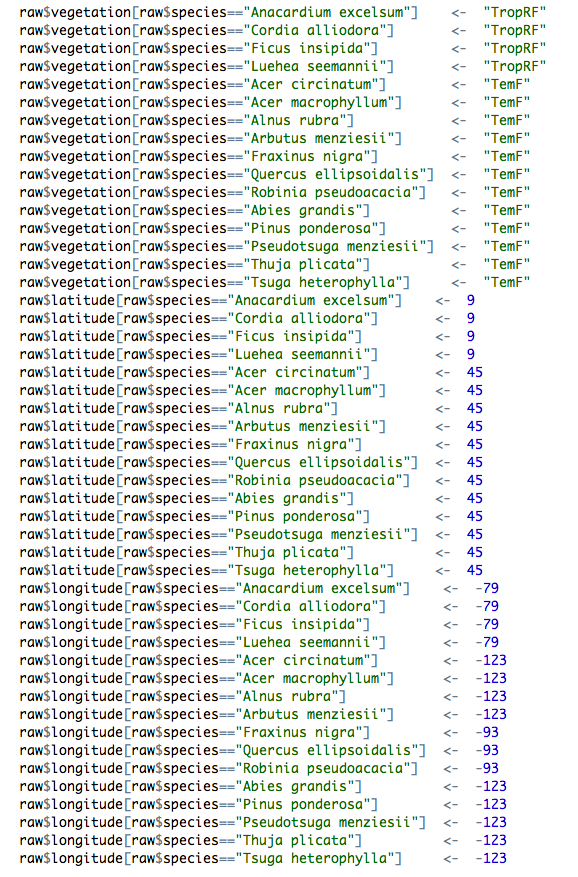
<p>In large analyses, this type of code may go for hundreds of lines.</p>

<p><img src="../../images/2013-07-09-modifying-data-with-lookup-tables/messy_script.png" /></p>

<p>Now before we go on, let me say that this approach to adding data is <em>much</em> better than editing your datafile directly, for the following two reasons:</p>

<ol>
  <li>It maintains the integrity of your raw data file</li>
  <li>You can see where the new value came from (it was added in a script), and modify it later if needed.</li>
</ol>

<p>There is also nothing <em>wrong</em> with adding data this way. However, it is what we would consider <em>messy</em> code, for these reasons:</p>

<ul>
  <li>Long chunks of code modifying data is inherently difficult to read.</li>
  <li>There’s a lot of typing involved, so lot’s of work, and thus opportunities for error.</li>
  <li>It’s harder to change variable names when they are embedded in code all over the place.</li>
</ul>

<p>A far <em>nicer</em> way to add data to an existing data frame is to use a lookup table. Here is an example of such a table, achieving similar (but not identical) modifications to the code above:</p>

<div class="bogus-wrapper"><notextile><figure class="code"><figcaption><span></span></figcaption><div class="highlight"><table><tr><td class="gutter"><pre class="line-numbers"><span class="line-number">1</span>
</pre></td><td class="code"><pre><code class="r"><span class="line">read.csv<span class="p">(</span><span class="s">&quot;dataNew.csv&quot;</span><span class="p">)</span>
</span></code></pre></td></tr></table></div></figure></notextile></div>

<div>
  <pre><code class="text">##   lookupVariable lookupValue newVariable              newValue
## 1             id           1     species  Banksia oblongifolia
## 2             id           2     species    Banksia ericifolia
## 3             id           3     species       Banksia serrata
## 4             id           4     species       Banksia grandis
## 5                         NA      family            Proteaceae
## 6                         NA    location                   NSW
## 7             id           4    location                    WA
##            source
## 1  Daniel Falster
## 2  Daniel Falster
## 3  Daniel Falster
## 4  Daniel Falster
## 5  Daniel Falster
## 6  Daniel Falster
## 7  Daniel Falster</code></pre>
</div>

<p>The columns of this table are</p>

<ul>
  <li><strong>lookupVariable</strong> is the name of the variable in the parent data we want to match against. If left  blank, change all rows.</li>
  <li><strong>lookupValue</strong> is the value of lookupVariable to match against</li>
  <li><strong>newVariable</strong> is the variable to be changed</li>
  <li><strong>newValue</strong> is the value of <code>newVariable</code> for matched rows</li>
  <li><strong>source</strong> includes any notes about where the data came from (e.g., who made the change)</li>
</ul>

<p>So the table documents the changes we want to make to our dataframe. The function <a href="https://gist.github.com/dfalster/5589956">addNewData.R</a> takes the file name for this table as an argument and applies it to the data frame. For example let’s assume we have a data frame called <code>data</code></p>

<div>
  <pre><code class="r">myData</code></pre>
</div>

<div>
  <pre><code class="text">##          x     y id
## 1  0.93160 5.433  1
## 2  0.24875 3.868  2
## 3  0.92273 5.944  2
## 4  0.85384 5.541  2
## 5  0.30378 3.985  2
## 6  0.41205 4.415  2
## 7  0.35158 4.440  2
## 8  0.13920 3.007  2
## 9  0.16579 2.976  2
## 10 0.66290 5.315  3
## 11 0.25720 3.755  3
## 12 0.88086 5.345  3
## 13 0.11784 3.183  3
## 14 0.01423 3.749  4
## 15 0.23359 4.264  4
## 16 0.33614 4.433  4
## 17 0.52122 4.393  4
## 18 0.11616 3.603  4
## 19 0.90871 6.379  4
## 20 0.75664 5.838  4</code></pre>
</div>

<p>and want to apply the table given above, we simply write</p>

<div class="bogus-wrapper"><notextile><figure class="code"><figcaption><span></span></figcaption><div class="highlight"><table><tr><td class="gutter"><pre class="line-numbers"><span class="line-number">1</span>
<span class="line-number">2</span>
<span class="line-number">3</span>
</pre></td><td class="code"><pre><code class="r"><span class="line">source<span class="p">(</span><span class="s">&quot;addNewData.r&quot;</span><span class="p">)</span>
</span><span class="line">allowedVars <span class="o">&lt;-</span> c<span class="p">(</span><span class="s">&quot;species&quot;</span><span class="p">,</span> <span class="s">&quot;family&quot;</span><span class="p">,</span> <span class="s">&quot;location&quot;</span><span class="p">)</span>
</span><span class="line">addNewData<span class="p">(</span><span class="s">&quot;dataNew.csv&quot;</span><span class="p">,</span> myData<span class="p">,</span> allowedVars<span class="p">)</span>
</span></code></pre></td></tr></table></div></figure></notextile></div>

<div>
  <pre><code class="text">##          x     y id              species     family location
## 1  0.93160 5.433  1 Banksia oblongifolia Proteaceae      NSW
## 2  0.24875 3.868  2   Banksia ericifolia Proteaceae      NSW
## 3  0.92273 5.944  2   Banksia ericifolia Proteaceae      NSW
## 4  0.85384 5.541  2   Banksia ericifolia Proteaceae      NSW
## 5  0.30378 3.985  2   Banksia ericifolia Proteaceae      NSW
## 6  0.41205 4.415  2   Banksia ericifolia Proteaceae      NSW
## 7  0.35158 4.440  2   Banksia ericifolia Proteaceae      NSW
## 8  0.13920 3.007  2   Banksia ericifolia Proteaceae      NSW
## 9  0.16579 2.976  2   Banksia ericifolia Proteaceae      NSW
## 10 0.66290 5.315  3      Banksia serrata Proteaceae      NSW
## 11 0.25720 3.755  3      Banksia serrata Proteaceae      NSW
## 12 0.88086 5.345  3      Banksia serrata Proteaceae      NSW
## 13 0.11784 3.183  3      Banksia serrata Proteaceae      NSW
## 14 0.01423 3.749  4      Banksia grandis Proteaceae       WA
## 15 0.23359 4.264  4      Banksia grandis Proteaceae       WA
## 16 0.33614 4.433  4      Banksia grandis Proteaceae       WA
## 17 0.52122 4.393  4      Banksia grandis Proteaceae       WA
## 18 0.11616 3.603  4      Banksia grandis Proteaceae       WA
## 19 0.90871 6.379  4      Banksia grandis Proteaceae       WA
## 20 0.75664 5.838  4      Banksia grandis Proteaceae       WA</code></pre>
</div>

<p>The large block of code is now reduced to a single line that clearly expresses what we want to achieve. Moreover, the new values (data) are stored as a table of <em>data</em> in a file, which is preferable to having data mixed in with our code.</p>

<p>You can use this approach
You can find the example files used here, as a <a href="https://gist.github.com/dfalster/5589956">github gist</a>.</p>

<p><strong>Acknowledgements:</strong> Many thanks to Rich FitzJohn and Diego Barneche for valuable discussions.</p>

]]></content>
  </entry>
  
  <entry>
    <title type="html"><![CDATA[Organizing the project directory]]></title>
    <link href="http://nicercode.github.io/blog/2013-05-17-organising-my-project/"/>
    <updated>2013-05-17T08:20:00+10:00</updated>
    <id>http://nicercode.github.io/blog/organising-my-project</id>
    <content type="html"><![CDATA[<p>This is a guest post by Marcela Diaz, a PhD student at Macquarie University. </p>

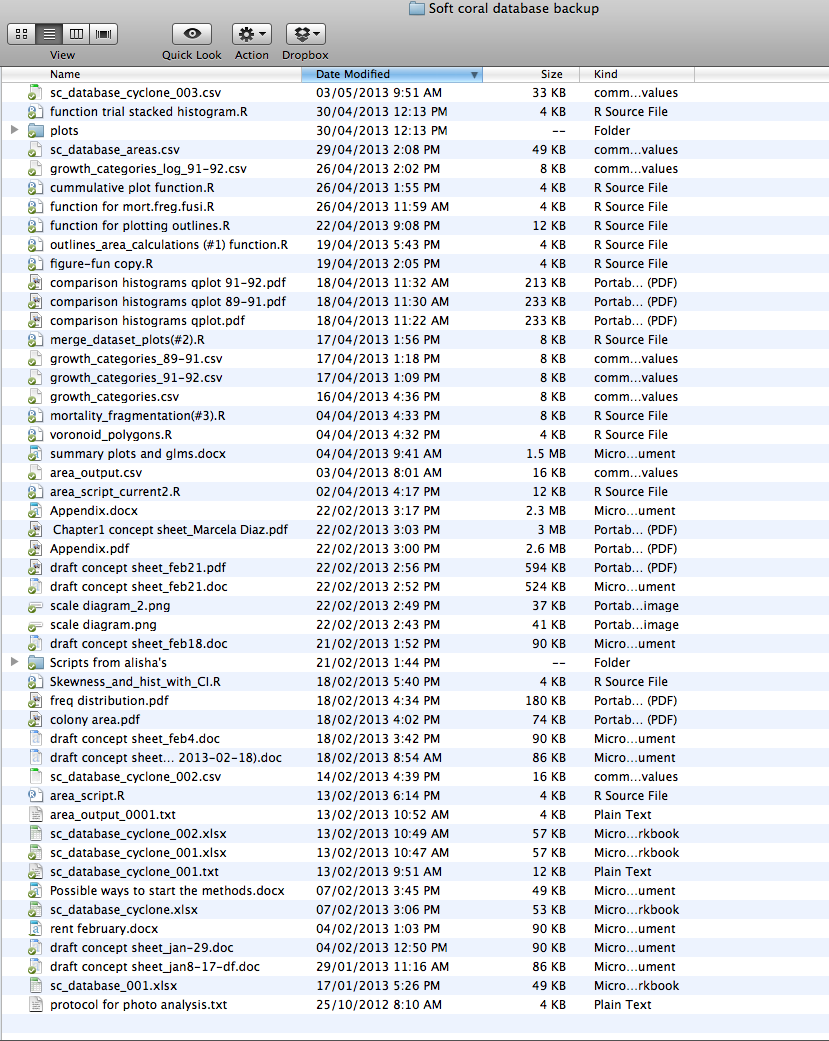
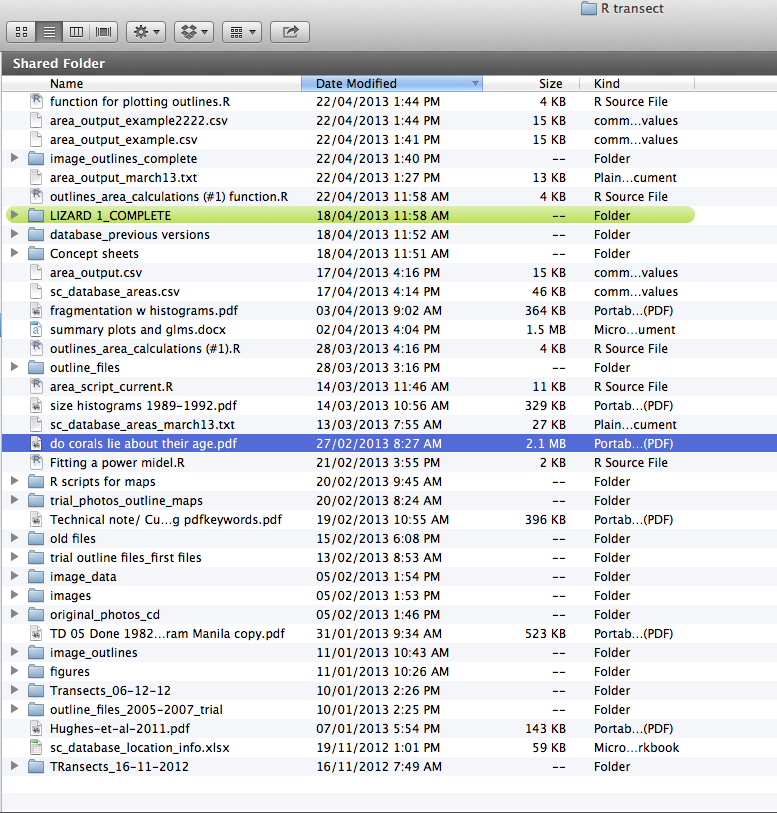
<p>Until recently, I hadn’t given much attention to organising files in my project. All the documents and files from my current project were spread out in two different folders, with very little sub folder division. All the files where together in the same place and I had multiple versions of the same file, with different dates. As you can see, things were getting a bit out of control.</p>

<!--more -->
<p><img src="../../images/2013-05-17-organising-my-project/directory1_before.png" /></p>

<p><img src="../../images/2013-05-17-organising-my-project/directory2_before.png" /></p>

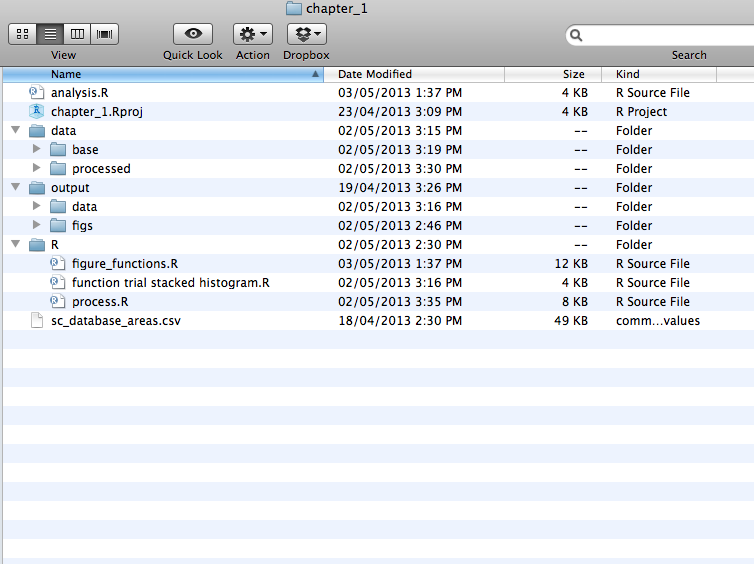
<p>Following <a href="../2013-04-05-projects/">advice from by Rich and Daniel</a>, I decided to spend a little time getting organised, adopting a directory layout with the following folders:</p>

<ul>
  <li>Data: which contains both my base (raw) data and the processed data </li>
  <li>Output: data and figures generated in R</li>
  <li>R: R scripts with all new functions I created as part of the cleaning directory process and in an attempt to write nicer code. </li>
  <li>Analysis (R file): R script sourcing all the functions necessary for the analysis </li>
</ul>

<p><img src="../../images/2013-05-17-organising-my-project/directory_after.png" /></p>

<p>At the same time I <a href="../../git">started using version control with git</a>. As a result, I no longer need to create a new file every time I make a change, and each of the files in the analysis directory is unique.</p>

<p>Setting up the new directory and sorting the existing files in the new folders didn’t take long and was relatively easy. Now it is really simple to find files and keep track of current and old figures. I no longer need to use spotlight to find the latest version of each script. From my experience this improved the organization and efficiency of my project; I  highly recommend keeping a good project layout. </p>
]]></content>
  </entry>
  
  <entry>
    <title type="html"><![CDATA[How long is a function?]]></title>
    <link href="http://nicercode.github.io/blog/2013-05-07-how-long-is-a-function/"/>
    <updated>2013-05-07T11:10:00+10:00</updated>
    <id>http://nicercode.github.io/blog/how-long-is-a-function</id>
    <content type="html"><![CDATA[<p>Within the R project and contributed packages, how long do functions
tend to be?  In our experience, people seem to think that functions
are only needed when you need to use a piece of code multiple times,
or when you have a really large problem.  However, many functions are
actually very small.</p>

<!-- more -->

<p>R allows a lot of “computation on the language”, simply meaning that
we can look inside objects easily.  Here is a function that returns
the number of lines in a function.</p>

<div class="bogus-wrapper"><notextile><figure class="code"><figcaption><span></span></figcaption><div class="highlight"><table><tr><td class="gutter"><pre class="line-numbers"><span class="line-number">1</span>
<span class="line-number">2</span>
<span class="line-number">3</span>
<span class="line-number">4</span>
<span class="line-number">5</span>
</pre></td><td class="code"><pre><code class="r"><span class="line">function.length <span class="o">&lt;-</span> <span class="kr">function</span><span class="p">(</span>f<span class="p">)</span> <span class="p">{</span>
</span><span class="line">  <span class="kr">if</span> <span class="p">(</span>is.character<span class="p">(</span>f<span class="p">))</span>
</span><span class="line">    f <span class="o">&lt;-</span> match.fun<span class="p">(</span>f<span class="p">)</span>
</span><span class="line">  length<span class="p">(</span>deparse<span class="p">(</span>f<span class="p">))</span>
</span><span class="line"><span class="p">}</span>
</span></code></pre></td></tr></table></div></figure></notextile></div>

<p>This works because <code>deparse</code> converts an object back into text (that
could in turn be parsed):</p>

<div class="bogus-wrapper"><notextile><figure class="code"><figcaption><span></span></figcaption><div class="highlight"><table><tr><td class="gutter"><pre class="line-numbers"><span class="line-number">1</span>
</pre></td><td class="code"><pre><code class="r"><span class="line">writeLines<span class="p">(</span>deparse<span class="p">(</span>function.length<span class="p">))</span>
</span></code></pre></td></tr></table></div></figure></notextile></div>

<div class="bogus-wrapper"><notextile><figure class="code"><figcaption><span></span></figcaption><div class="highlight"><table><tr><td class="gutter"><pre class="line-numbers"><span class="line-number">1</span>
<span class="line-number">2</span>
<span class="line-number">3</span>
<span class="line-number">4</span>
<span class="line-number">5</span>
<span class="line-number">6</span>
</pre></td><td class="code"><pre><code class=""><span class="line">function (f) 
</span><span class="line">{
</span><span class="line">    if (is.character(f)) 
</span><span class="line">        f &lt;- match.fun(f)
</span><span class="line">    length(deparse(f))
</span><span class="line">}</span></code></pre></td></tr></table></div></figure></notextile></div>

<p>so the <code>function.length</code> function is itself 6 lines long by this
measure.  Note that the formatting is actually a bit different, in
particular indentation, braces position and spacing is different,
following the likes of the R-core style guide.</p>

<p>Most packages consist mostly of functions: here is a function that
extracts all functions from a package:</p>

<div class="bogus-wrapper"><notextile><figure class="code"><figcaption><span></span></figcaption><div class="highlight"><table><tr><td class="gutter"><pre class="line-numbers"><span class="line-number">1</span>
<span class="line-number">2</span>
<span class="line-number">3</span>
<span class="line-number">4</span>
<span class="line-number">5</span>
<span class="line-number">6</span>
<span class="line-number">7</span>
</pre></td><td class="code"><pre><code class=""><span class="line">package.functions &lt;- function(package) {
</span><span class="line">  pkg &lt;- sprintf("package:%s", package)
</span><span class="line">  object.names &lt;- ls(name=pkg)
</span><span class="line">  objects &lt;- lapply(object.names, get, pkg)
</span><span class="line">  names(objects) &lt;- object.names
</span><span class="line">  objects[sapply(objects, is.function)]
</span><span class="line">}</span></code></pre></td></tr></table></div></figure></notextile></div>

<p>Finally, we can get the lengths of all functions in a package:</p>

<div class="bogus-wrapper"><notextile><figure class="code"><figcaption><span></span></figcaption><div class="highlight"><table><tr><td class="gutter"><pre class="line-numbers"><span class="line-number">1</span>
<span class="line-number">2</span>
</pre></td><td class="code"><pre><code class=""><span class="line">package.function.lengths &lt;- function(package)
</span><span class="line">  vapply(package.functions(package), function.length, integer(1))</span></code></pre></td></tr></table></div></figure></notextile></div>

<p>Looking at the recommended package “boot”</p>

<div class="bogus-wrapper"><notextile><figure class="code"><figcaption><span></span></figcaption><div class="highlight"><table><tr><td class="gutter"><pre class="line-numbers"><span class="line-number">1</span>
<span class="line-number">2</span>
</pre></td><td class="code"><pre><code class="r"><span class="line">library<span class="p">(</span>boot<span class="p">)</span>
</span><span class="line">package.function.lengths<span class="p">(</span><span class="s">&quot;boot&quot;</span><span class="p">)</span>
</span></code></pre></td></tr></table></div></figure></notextile></div>

<div class="bogus-wrapper"><notextile><figure class="code"><figcaption><span></span></figcaption><div class="highlight"><table><tr><td class="gutter"><pre class="line-numbers"><span class="line-number">1</span>
<span class="line-number">2</span>
<span class="line-number">3</span>
<span class="line-number">4</span>
<span class="line-number">5</span>
<span class="line-number">6</span>
<span class="line-number">7</span>
<span class="line-number">8</span>
<span class="line-number">9</span>
<span class="line-number">10</span>
<span class="line-number">11</span>
<span class="line-number">12</span>
<span class="line-number">13</span>
<span class="line-number">14</span>
<span class="line-number">15</span>
<span class="line-number">16</span>
<span class="line-number">17</span>
<span class="line-number">18</span>
</pre></td><td class="code"><pre><code class=""><span class="line">     abc.ci            boot      boot.array         boot.ci 
</span><span class="line">         54             126              56              80 
</span><span class="line">   censboot         control            corr            cum3 
</span><span class="line">        137              72               8               8 
</span><span class="line">     cv.glm     EEF.profile      EL.profile          empinf 
</span><span class="line">         42              16              27              79 
</span><span class="line">   envelope        exp.tilt      freq.array        glm.diag 
</span><span class="line">         56              49               7              19 
</span><span class="line"> glm.diag.plots     imp.moments        imp.prob    imp.quantile 
</span><span class="line">         69              37              34              39 
</span><span class="line">imp.weights       inv.logit jack.after.boot       k3.linear 
</span><span class="line">         34               2              69              14 
</span><span class="line">     lik.CI   linear.approx           logit     nested.corr 
</span><span class="line">         36              34               2              28 
</span><span class="line">    norm.ci          saddle    saddle.distn         simplex 
</span><span class="line">         33             179             281              65 
</span><span class="line">   smooth.f       tilt.boot          tsboot      var.linear 
</span><span class="line">         36              57              97              14 </span></code></pre></td></tr></table></div></figure></notextile></div>

<p>I have 138 packages installed on my computer (mostly through
dependencies – small compared with the ~4000 on CRAN!).  We need to
load them all before we can access the functions within:</p>

<div class="bogus-wrapper"><notextile><figure class="code"><figcaption><span></span></figcaption><div class="highlight"><table><tr><td class="gutter"><pre class="line-numbers"><span class="line-number">1</span>
<span class="line-number">2</span>
<span class="line-number">3</span>
<span class="line-number">4</span>
</pre></td><td class="code"><pre><code class="r"><span class="line">library<span class="p">(</span>utils<span class="p">)</span>
</span><span class="line">packages <span class="o">&lt;-</span> rownames<span class="p">(</span>installed.packages<span class="p">())</span>
</span><span class="line"><span class="kr">for</span> <span class="p">(</span>p <span class="kr">in</span> packages<span class="p">)</span>
</span><span class="line">  library<span class="p">(</span>p<span class="p">,</span> character.only<span class="o">=</span><span class="kc">TRUE</span><span class="p">)</span>
</span></code></pre></td></tr></table></div></figure></notextile></div>

<p>Then we can apply the <code>package.function.lengths</code> to each package.</p>

<div class="bogus-wrapper"><notextile><figure class="code"><figcaption><span></span></figcaption><div class="highlight"><table><tr><td class="gutter"><pre class="line-numbers"><span class="line-number">1</span>
</pre></td><td class="code"><pre><code class="r"><span class="line">lens <span class="o">&lt;-</span> lapply<span class="p">(</span>packages<span class="p">,</span> package.function.lengths<span class="p">)</span>
</span></code></pre></td></tr></table></div></figure></notextile></div>

<p>The median function length is only 12 lines (and remember that
includes things like the function arguments)!</p>

<div class="bogus-wrapper"><notextile><figure class="code"><figcaption><span></span></figcaption><div class="highlight"><table><tr><td class="gutter"><pre class="line-numbers"><span class="line-number">1</span>
</pre></td><td class="code"><pre><code class="r"><span class="line">median<span class="p">(</span>unlist<span class="p">(</span>lens<span class="p">))</span>
</span></code></pre></td></tr></table></div></figure></notextile></div>

<div class="bogus-wrapper"><notextile><figure class="code"><figcaption><span></span></figcaption><div class="highlight"><table><tr><td class="gutter"><pre class="line-numbers"><span class="line-number">1</span>
</pre></td><td class="code"><pre><code class=""><span class="line">[1] 12</span></code></pre></td></tr></table></div></figure></notextile></div>

<p>The distribution of function lengths is strongly right skewed, with
most functions being very short.  Ignoring the 1% of functions that
are longer than 200 lines long, the distribution of function lengths
looks like this:</p>

<div class="bogus-wrapper"><notextile><figure class="code"><figcaption><span></span></figcaption><div class="highlight"><table><tr><td class="gutter"><pre class="line-numbers"><span class="line-number">1</span>
<span class="line-number">2</span>
</pre></td><td class="code"><pre><code class=""><span class="line">tmp &lt;- unlist(lens)
</span><span class="line">hist(tmp[tmp &lt;= 200], main="", xlab="Function length (lines)")</span></code></pre></td></tr></table></div></figure></notextile></div>

<p><img src="http://nicercode.github.io/images/2013-05-07-how-long-is-a-function/function-length-distribution.png" /></p>

<p>Then plot the distribution of the per-package median (that is, for
each package compute the median function length in terms of lines of
code and plot the distribution of those medians).</p>

<div class="bogus-wrapper"><notextile><figure class="code"><figcaption><span></span></figcaption><div class="highlight"><table><tr><td class="gutter"><pre class="line-numbers"><span class="line-number">1</span>
<span class="line-number">2</span>
</pre></td><td class="code"><pre><code class=""><span class="line">lens.median &lt;- sapply(lens, median)
</span><span class="line">hist(lens.median, main="", xlab="Per-package median function length")</span></code></pre></td></tr></table></div></figure></notextile></div>

<p><img src="http://nicercode.github.io/images/2013-05-07-how-long-is-a-function/function-length-median.png" /></p>

<p>The median package has a median function length of 16 lines.  There
are handful of extremely long functions in most packages; over all
packages, the median “longest function” is 120 lines.</p>
]]></content>
  </entry>
  
  <entry>
    <title type="html"><![CDATA[Excel and line endings]]></title>
    <link href="http://nicercode.github.io/blog/2013-04-30-excel-and-line-endings/"/>
    <updated>2013-04-30T09:39:00+10:00</updated>
    <id>http://nicercode.github.io/blog/excel-and-line-endings</id>
    <content type="html"><![CDATA[<p>On a Mac, Excel produces csv files with the wrong line endings, which
causes problems for git (amongst other things).</p>

<p>This issue plagues at least
<a href="http://developmentality.wordpress.com/2010/12/06/excel-2008-for-macs-csv-bug/">Excel 2008</a>
and 2011, and possibly other versions.</p>

<p>Basically, saving a file as comma separated values (csv) uses a
carriage return <code>\r</code> rather than a line feed <code>\n</code> as a newline.  Way
back before OS X, this was actually the correct Mac file ending, but
after the move to be more unix-y, the correct line ending should be
<code>\n</code>.</p>

<!-- more -->

<p>Given that nothing has used this as the proper line endings for over a
decade, this is a bug.  It’s a real pity that Microsoft does not see
fit to fix it.</p>

<h2 id="why-this-is-a-problem">Why this is a problem</h2>

<p>This breaks a number of scripts that require specific line endings.</p>

<p>This also causes problems when version controlling your data.  In
particular, tools like <code>git diff</code> basically stop working as they work
line-by-line and see only one long line
(e.g. <a href="http://stackoverflow.com/questions/11531084/strange-git-line-ending-issue">here</a>).
Not having <code>diff</code> work properly makes it really hard to see where
changes have occurred in your data.</p>

<p>Git has really nice facilities for translating between different line
endings – in particular between Windows and Unix/(new) Mac endings.
However, they do basically nothing with old-style Mac endings because
<em>no sane application should create them</em>.  See
<a href="https://github.com/git/git/blob/master/convert.c#L93">here</a>, for
example.</p>

<h2 id="a-solution">A solution</h2>
<p>There are at leat two stack overflow questions that deal with this 
(<a href="http://stackoverflow.com/questions/10491564/git-and-cr-vs-lf-but-not-crlf?rq=1">1</a>
and
(<a href="http://stackoverflow.com/questions/11531084/strange-git-line-ending-issue">2</a>).</p>

<p>The solution is to edit <code>.git/config</code> (within your repository) to add
lines saying:</p>

<div class="bogus-wrapper"><notextile><figure class="code"><div class="highlight"><table><tr><td class="gutter"><pre class="line-numbers"><span class="line-number">1</span>
<span class="line-number">2</span>
<span class="line-number">3</span>
</pre></td><td class="code"><pre><code class=""><span class="line">[filter "cr"]
</span><span class="line">    clean = LC_CTYPE=C awk '{printf(\"%s\\n\", $0)}' | LC_CTYPE=C tr '\\r' '\\n'
</span><span class="line">    smudge = tr '\\n' '\\r'</span></code></pre></td></tr></table></div></figure></notextile></div>

<p>and then create a file <code>.gitattributes</code> that contains the line</p>

<div class="bogus-wrapper"><notextile><figure class="code"><div class="highlight"><table><tr><td class="gutter"><pre class="line-numbers"><span class="line-number">1</span>
</pre></td><td class="code"><pre><code class=""><span class="line">*.csv filter=cr</span></code></pre></td></tr></table></div></figure></notextile></div>

<p>This translates the line endings on import and back again on export
(so you never change your working file).  Things like <code>git diff</code> use
the “clean” version, and so magically start working again.</p>

<p>While the <code>.gitattributes</code> file can be (and should be) put under
version control, the <code>.git/config</code> file needs to be set up separately
on <em>every clone</em>.  There are good reasons for this (see
<a href="http://stackoverflow.com/questions/6547933/is-it-possible-to-clone-git-config-from-remote-location">here</a>.
It would be possible to automate this to some degree with the
<code>--config</code> argument to <code>git clone</code>, but that’s still basically manual.</p>

<h2 id="issues">Issues</h2>

<p>This seems to generally work, but twice in use large numbers of files
have been marked as changed when the filter got out-of-sync.  We never
worked out what caused this, but one possible culprit seems to be
<a href="http://www.dropbox.com">Dropbox</a> (but you probably should not keep
repositories on dropbox anyway).</p>

<h2 id="alternative-solutions">Alternative solutions</h2>

<p>The nice thing about the clean/smudge solution is that it leaves files
in the working directory unmodified.  An alternative approach would be
to set up a pre-commit-hook that ran csv files through a similar
filter.  This will modify the contents of the working directory (and
may require reloading the files in Excel) but from that point on the
file will have proper line endings.</p>

<p>More manually, if files are saved as “Windows comma separated (.csv)”
you will get windows-style line endings (<code>\r\n</code>) which are at least
treated properly by git and are in common usage this century.
However, this requires more remembering and makes saving csv files
from Excel even more tricky than normal.</p>
]]></content>
  </entry>
  
  <entry>
    <title type="html"><![CDATA[git]]></title>
    <link href="http://nicercode.github.io/blog/2013-04-23-git/"/>
    <updated>2013-04-23T17:51:00+10:00</updated>
    <id>http://nicercode.github.io/blog/git</id>
    <content type="html"><![CDATA[<p>Thanks to everyone who came along and was such good sports with
learning git today. Hopefully you now have enough tools to help you use git in your own
projects. The notes are available (in fairly raw form)
<a href="http://nicercode.github.io/git">here</a>. Please let us know where they are unclear and we will
update them.</p>

<p>To re-emphasise our closing message – start using it on a
project, start thinking about what you want to track, and start
thinking about what constitutes a logical commit.  Once you get into a
rhythm it will seem much easier.  Bring your questions along to the
class in 2 weeks time.</p>

<p>Also, to re-emphasise that git is not a backup system.  Make sure that
you have your work backed up, just in case something terrible happens.
I recommend <a href="http://www.crashplan.com/">crash plan</a> which you can use
for free for backing up onto external hard drives (and for a fee).</p>

<h2 id="feedback">Feedback</h2>

<p>We welcome any and all feedback on the material and how we present it.
You can give <em>anonymous</em> feedback by emailing G2G admin (you should
have the address already – I’m only not putting it up here in a vain
effort to slow down spam bots).  Alternatively, you are welcome to
email either or both of us, or leave a comment on a relevant page.</p>
]]></content>
  </entry>
  
  <entry>
    <title type="html"><![CDATA[Why I want to write nice R code]]></title>
    <link href="http://nicercode.github.io/blog/2013-04-05-why-nice-code/"/>
    <updated>2013-04-05T14:46:00+11:00</updated>
    <id>http://nicercode.github.io/blog/why-nice-code</id>
    <content type="html"><![CDATA[<!--
Why are students here
Goals: performance, learning, affective, social
Value: attainment, intrinsic, instrumental

Instrumental - allows you to accomplish other important goals (extrinsic
rewards), i.e. learn about world, write papers, impress others
Intrinsic - value nice code for itself (craftsmanship)
Attainment -  satisfaction in getting something to work
-->

<p>Writing code is fast becoming a key - if not the most important - skill for
doing research in the 21st century. As scientists, we live in extraordinary
times. The amount of data (information) available to us is increasing
exponentially, allowing for rapid advances in our understanding of the world
around us. The amount of information contained in a standard scientific paper
also seems to be on the rise. Researchers therefore need to be able to handle
ever larger amounts of data to ask novel questions and get papers published.
Yet, the standard tools used by many biologists -  point and click programs for
manipulating data, doing stats and making plots - do not allow us to scale-up
our analyses to match data availability, at least not without many, many more
‘clicks’.</p>

<!-- more -->

<p><span class="caption-wrapper right"><img class="caption" src="http://nicercode.github.io/images/2013-04-05-why-nice-code/geeks-vs-nongeeks-repetitive-tasks.png" width="" height="" alt="Why writing code saves you time with repetitive tasks, by [Bruno Oliveira](https://plus.google.com/+BrunoOliveira/posts/MGxauXypb1Y)" title="Why writing code saves you time with repetitive tasks, by [Bruno Oliveira](https://plus.google.com/+BrunoOliveira/posts/MGxauXypb1Y)" /><span class="caption-text">Why writing code saves you time with repetitive tasks, by <a href="https://plus.google.com/+BrunoOliveira/posts/MGxauXypb1Y">Bruno Oliveira</a></span></span></p>

<p>The solution is to write scripts in programs like
<a href="http://www.r-project.org/">R</a>, <a href="http://www.python.org/">python</a> or
<a href="http://www.mathworks.com.au/products/matlab/">matlab</a>. Scripting allows you to
automate analyses, and therefore scale-up without a big increase in
effort.</p>

<p>Writing code also offers other benefits to research. When your
analyses are documented in a script, it is easier to pick up a project and
start working on it again. You have a record of what you did and why. Chunks
of code can also be reused in new projects, saving vast amount of time. Writing
code also allows for effective collaboration with people from all over the
world. For all these reasons, many researchers are now learning how to write
code.</p>

<p>Yet, most researchers have no or limited formal training in computer science,
and thus struggle to write nice code (<a href="http://dx.doi.org/10.1038/467775a">Merali 2010</a>). Most of us are self-taught, having used a
mix of books, advice from other amateur coders, internet posts, and lots of
trial and error. Soon after have we written our first R script, our hard drives
explode with large bodies of barely readable code that we only half understand,
that also happens to be full of bugs and is generally difficult to use. Not
surprisingly, many researchers find writing code to be a relatively painful
process, involving lots of trial and error and, inevitably, frustration.</p>

<p>If this sounds familiar to you, don’t worry, you are not alone. There are many
<a href="http://nicercode.github.io/intro/resources.html">great R resources</a> available, but most show you how
to do some fancy trick, e.g. run some complicated statistical test or make a
fancy plot. Few people - outside of computer science departments - spend time
discussing the qualities of nice code and teaching you good coding habits.
Certainly no one is teaching you these skills in your standard biology research
department.</p>

<blockquote class="twitter-tweet"><p>Learn to code! I worry that most biologists leave uni lacking #1 skill for 21st cent biology. For inspiration <a href="http://t.co/7lzRutYuIw" title="http://code.org">code.org</a> <a href="https://twitter.com/search/%23CODE">#CODE</a></p>&mdash; Daniel Falster (@adaptive_plant) <a href="https://twitter.com/adaptive_plant/status/306854385076543488">February 27, 2013</a></blockquote>
<script async="" src="http://nicercode.github.io//platform.twitter.com/widgets.js" charset="utf-8"></script>

<p>Observing how colleagues were struggling with their code, we
(<a href="http://nicercode.github.io/about#Team">Rich FitzJohn and Daniel Falster</a>) have teamed up to bring you
the <a href="http://nicercode.github.io/">nice R code</a> course and blog. We are
targeting researchers who are already using R and want to take their coding to
the next level. Our goal is to help you write nicer code.</p>

<blockquote>
  <p>By ‘nicer’ we mean
code that is easy to read, easy to write, runs fast, gives reliable results, is
easy to reuse in new projects, and is easy to share with collaborators.</p>
</blockquote>

<p>We
will be focussing on elements of workflow, good coding habits and some tricks,
that will help transform your code from messy to nice.</p>

<p>The inspiration for nice R code came in part from attending a boot camp run by
Greg Wilson from the <a href="http://software-carpentry.org/">software carpentry team</a>.
These boot camps aim to help researchers be more productive by teaching them
basic computing skills. Unlike other software courses we had attended, the
focus in the boot camps was on good programming habits and design. As
biologists, we saw a need for more material focussed on R, the language that
has come to dominate biological research. We are not experts, but have more
experience than many biologists. Hence the nice R code blog.</p>

<blockquote class="twitter-tweet"><p>@<a href="https://twitter.com/phylorich">phylorich</a> Being able to code (in any language) is most important skill for current biology. R is good choice: widely used, high level, free</p>&mdash; Daniel Falster (@adaptive_plant) <a href="https://twitter.com/adaptive_plant/status/312438921059520512">March 15, 2013</a></blockquote>
<script async="" src="http://nicercode.github.io//platform.twitter.com/widgets.js" charset="utf-8"></script>

<h2 id="key-elements-of-nice-r-code">Key elements of nice R code</h2>
<p>We will now briefly consider some of the key principles of writing nice code.</p>

<h3 id="nice-code-is-easy-to-read">Nice code is easy to read</h3>

<blockquote><p>Programs should be written for people to read, and only incidentally for<br />machines to execute.</p><footer><strong>Abelson and Sussman</strong> <cite>Structure and Interpretation of Computer Programs</cite></footer></blockquote>

<p>Readability is by far the most important guiding principle for writing nicer
code. <strong>Anyone (especially you) should be able to pick up any of your
projects, understand what the code does and how to run it</strong>. Most code
written for research purposes is not easy to read.</p>

<p>In our opinion, there are no fixed rules for what nice code should look like.
There
is just a single test: is it easy to read? To check how nice your code
is, pass it to a collaborator, or pick up some code you haven’t used for
over a year. Do they (you) understand it?</p>

<p>Below are some general guidelines for making your code more readable. We
will explore each of these in more detail here on the blog:</p>

<ul>
  <li>Use a sensible directory structure for organising project related
materials.</li>
  <li>Abstract your code into many small functions with helpful descriptive
names</li>
  <li>Use comments, design features, and meaningful variable or function names
to capture the intent of your code, i.e. describe what it is <em>meant</em> to do</li>
  <li>Use version control. Of the many reasons for using version control, one is
that it archives older versions of your code, permitting you to ruthlessly
yet safely delete old files. This helps reduce clutter and improves readability.</li>
  <li>Apply a consistent style, such as that described in  the</li>
  <li><a href="http://google-styleguide.googlecode.com/svn/trunk/google-r-style.html">google R style guide</a>.</li>
</ul>

<h3 id="nice-code-is-reliable-ie-bug-free">Nice code is reliable, i.e. bug free</h3>

<blockquote class="twitter-tweet"><p>Occma&#8217;s raz0r: if your program isn&#8217;t working, it&#8217;s probably just a typo in the code, not an undiscovered bug or thing you&#8217;re doing wrong</p>&mdash; Alison Abreu-Garcia (@alisonag) <a href="https://twitter.com/alisonag/status/322374461212995584">April 11, 2013</a></blockquote>
<script async="" src="http://nicercode.github.io//platform.twitter.com/widgets.js" charset="utf-8"></script>

<p>The computer does exactly what you tell it to. If there is a problem in your code, it’s most likely you put it there. How certain
are you that your code is error free? More than once I have reached a state
of near panic, looking over my code to ensure it is bug free before
submitting a final version of a paper for publication. What if I got it wrong?</p>

<p><a href="http://dx.doi.org/10.1109/MCSE.2005.54">It is almost impossible to ensure code is bug free</a>, but one can adopt healthy
habits that minimise the chance of this occurring:</p>

<ul>
  <li>Don’t repeat yourself. The less you type, the fewer chances there are for
mistakes</li>
  <li>Use test scripts, to compare your code against known cases</li>
  <li>Avoid using global variables, the attach function and <a href="../intro/bad-habits.html">other nasties</a>
where ownership of data cannot be ensured</li>
  <li>Use version control so that you see what has changed, and easily trace
mistakes</li>
  <li>Wherever possible, open your code and project up for review, either by
colleagues, during review process, or in repositories such as github.</li>
  <li>The more <em>readable</em> your code is, the less likely it is to contain
errors.</li>
</ul>

<blockquote class="twitter-tweet"><p>&#8220;Every bug is two bugs: the bug in your code, and the test you didn&#8217;t write&#8221;@<a href="https://twitter.com/estherbester">estherbester</a> <a href="https://twitter.com/search/%23pycon">#pycon</a></p>&mdash; Ned Batchelder (@nedbat) <a href="https://twitter.com/nedbat/status/312628852558032896">March 15, 2013</a></blockquote>
<script async="" src="http://nicercode.github.io//platform.twitter.com/widgets.js" charset="utf-8"></script>

<h3 id="nice-code-runs-quickly-and-is-therefore-a-pleasure-to-use">Nice code runs quickly and is therefore a pleasure to use</h3>

<blockquote>
  <p>The faster you can make the plot, the more fun you will have.</p>
</blockquote>

<p>Code that is slow to run is less fun to use. By <em>slow</em> I mean anything
that takes more than a few seconds to run, so impedes analysis.
Speed is particularly an issue for people analysing large datasets, or
running complex simulations, where code may run for many hours, days,
or weeks.</p>

<p>Some effective strategies for making code run faster:</p>

<ul>
  <li>Abstract your code into functions, so that you can compare different
versions</li>
  <li>Use code profiling to identify the main computational bottlenecks
and improve them</li>
  <li>Think carefully about algorithm design</li>
  <li>Understand why some operations are intrinsically slower
than others, e.g. why a <code>for</code> loop is slower than using <code>lapply</code></li>
  <li>Use multiple processors to increase computing power, either in your
own machine or by running your code on a cluster.</li>
</ul>

<h2 id="the-benefits-of-writing-nicer-code">The benefits of writing nicer code</h2>
<p>There are many benefits of writing nicer code:</p>

<ul>
  <li><strong>Better science</strong>: nice code allows you to handle bigger data sets and has less bugs.</li>
  <li><strong>More fun</strong>: spend less time wrestling with R, and more time working with data.</li>
  <li><strong>Become more efficient</strong>: Nice code is reusable, sharable, and quicker to run.</li>
  <li><strong>Future employment</strong>: You should consider anything you write (open or closed) to be a potential advert to a future employer. Code has impact. Code sharing <a href="http://resume.github.io/?cboettig">sites like github now make resumes for you</a>, to capture your impact.  Scientists with an analytical bent are often <a href="http://www.nature.com/naturejobs/science/articles/10.1038/nj7440-271">sought-after in the natural sciences</a>.</li>
</ul>

<p>If you need further motivation, consider this advice</p>

<p><span class="caption-wrapper centre"><img class="caption" src="http://nicercode.github.io/images/2013-04-05-why-nice-code/Maniac.jpg" width="" height="" alt="An [advisory pop-up for MS Visual C++](http://www.winsoft.se/2009/08/the-maintainer-might-be-a-maniac-serial-killer)" title="An [advisory pop-up for MS Visual C++](http://www.winsoft.se/2009/08/the-maintainer-might-be-a-maniac-serial-killer)" /><span class="caption-text">An <a href="http://www.winsoft.se/2009/08/the-maintainer-might-be-a-maniac-serial-killer">advisory pop-up for MS Visual C++</a></span></span></p>

<p>This might seem extreme, until you realise that the maniac serial killer is
<strong>you</strong>, and you definitely know where you live.</p>

<p>At some point, you will
return to nearly every piece of code you wrote and need to understand it
afresh. If it is messy code, you will spend a lot of time going over it to
understand what you did, possibly a week, month, year or decade ago. Although
you are unlikely get so frustrated as to seek bloody revenge on your former
self, you might come close.</p>
<blockquote><p>The single biggest reason you should write nice code is so that your future<br /> self can understand it.</p><footer><strong>Greg Wilson</strong> <cite>Software Carpentry Course</cite></footer></blockquote>

<p>As a by product, code that is easy to read is also easy to
reuse in new projects and share with colleagues, including as online
supplementary material. Increasingly, journals are requiring code be submitted
as part of the review process and these are often published online. Alas, much of the
current crop of code is difficult to read. At best, having messy code may reduce
the impact of your paper. But you might also get rejected because the
reviewer couldn’t understand your code. At worst, some people have had to <a href="http://www.sciencemag.org/content/314/5807/1856.summary">retract high profile work because of bugs in their code</a>.</p>

<p>It’s time to write some nice R code.</p>

<p>For further inspiration, you may like to check out Greg Wilson’s great article “<a href="http://arxiv.org/abs/1210.0530">Best Practices for Scientific Computing</a>.”</p>

<p><strong>Acknowledgments:</strong> Many thanks to <a href="https://twitter.com/gvwilson">Greg Wilson</a>, <a href="http://inundata.org/">Karthik Ram</a>, <a href="http://schamberlain.github.io/scott/">Scott Chameberlain</a> and <a href="http://www.carlboettiger.info/">Carl Boettiger</a> and <a href="http://www.zoology.ubc.ca/~fitzjohn/">Rich FitzJohn</a> for inspirational chats, code and work.</p>
]]></content>
  </entry>
  
  <entry>
    <title type="html"><![CDATA[Designing projects]]></title>
    <link href="http://nicercode.github.io/blog/2013-04-05-projects/"/>
    <updated>2013-04-05T14:34:00+11:00</updated>
    <id>http://nicercode.github.io/blog/projects</id>
    <content type="html"><![CDATA[<p>The scientific process is naturally incremental, and many projects
start life as random notes, some code, then a manuscript, and
eventually everything is a bit mixed together.</p>

<!-- more -->

<blockquote class="twitter-tweet"><p>Managing your projects in a reproducible fashion doesn&#8217;t just make your science reproducible, it makes your life easier.</p>&mdash; Vince Buffalo (@vsbuffalo) <a href="https://twitter.com/vsbuffalo/status/323638476153167872">April 15, 2013</a></blockquote>
<script async="" src="http://nicercode.github.io//platform.twitter.com/widgets.js" charset="utf-8"></script>

<h1 id="directory-layout">Directory layout</h1>

<p>A good project layout helps ensure the</p>

<ul>
  <li>Integrity of data</li>
  <li>Portability of the project</li>
  <li>Easier to pick the project back up after a break</li>
</ul>

<p>There is no one way to lay a project out.  Daniel and I both have
different approaches for different projects, reflecting the history of
the project, who else is collaborating on that project.</p>

<p>Here are a couple of different ideas for laying a project out.  This
is the basic structure that I tend to use:</p>

<div class="bogus-wrapper"><notextile><figure class="code"><div class="highlight"><table><tr><td class="gutter"><pre class="line-numbers"><span class="line-number">1</span>
<span class="line-number">2</span>
<span class="line-number">3</span>
<span class="line-number">4</span>
<span class="line-number">5</span>
<span class="line-number">6</span>
</pre></td><td class="code"><pre><code class=""><span class="line">proj/
</span><span class="line">├── R/
</span><span class="line">├── data/
</span><span class="line">├── doc/
</span><span class="line">├── figs/
</span><span class="line">└── output/</span></code></pre></td></tr></table></div></figure></notextile></div>

<ul>
  <li>
    <p>The <code>R</code> directory contains various files with function definitions
(but <em>only</em> function definitions - no code that actually runs).</p>
  </li>
  <li>
    <p>The <code>data</code> directory contains data used in the analysis.  This is
treated as <em>read only</em>; in paricular the R files are never allowed
to write to the files in here.  Depending on the project, these
might be csv files, a database, and the directory itself may have
subdirectories.</p>
  </li>
  <li>
    <p>The <code>doc</code> directory contains the paper.  I work in LaTeX which is
nice because it can pick up figures directly made by R.  Markdown
can do the same and is starting to get traction among biologists.
With Word you’ll have to paste them in yourself as the figures
update.</p>
  </li>
  <li>
    <p>The <code>figs</code> directory contains the figures.  This directory <em>only
contains generated files</em>; that is, I should always be able to
delete the contents and regenerate them.</p>
  </li>
  <li>
    <p>The <code>output</code> directory contains simuation output, processed
datasets, logs, or other processed things.</p>
  </li>
</ul>

<p>In this set up, I usually have the R script files that <em>do</em> things in
the project root:</p>

<div class="bogus-wrapper"><notextile><figure class="code"><div class="highlight"><table><tr><td class="gutter"><pre class="line-numbers"><span class="line-number">1</span>
<span class="line-number">2</span>
<span class="line-number">3</span>
<span class="line-number">4</span>
<span class="line-number">5</span>
<span class="line-number">6</span>
<span class="line-number">7</span>
</pre></td><td class="code"><pre><code class=""><span class="line">proj/
</span><span class="line">├── R/
</span><span class="line">├── data/
</span><span class="line">├── doc/
</span><span class="line">├── figs/
</span><span class="line">├── output/
</span><span class="line">└── analysis.R</span></code></pre></td></tr></table></div></figure></notextile></div>

<p>For very simple projects, you might drop the R directory, perhaps
replacing it with a single file <code>analysis-functions.R</code> which you
source.</p>

<p>The top of the analysis file usually looks something like</p>

<div class="bogus-wrapper"><notextile><figure class="code"><figcaption><span></span></figcaption><div class="highlight"><table><tr><td class="gutter"><pre class="line-numbers"><span class="line-number">1</span>
<span class="line-number">2</span>
<span class="line-number">3</span>
<span class="line-number">4</span>
</pre></td><td class="code"><pre><code class="r"><span class="line">library<span class="p">(</span>some_package<span class="p">)</span>
</span><span class="line">library<span class="p">(</span>some_other_package<span class="p">)</span>
</span><span class="line">source<span class="p">(</span><span class="s">&quot;R/functions.R&quot;</span><span class="p">)</span>
</span><span class="line">source<span class="p">(</span><span class="s">&quot;R/utilities.R&quot;</span><span class="p">)</span>
</span></code></pre></td></tr></table></div></figure></notextile></div>

<p>…followed by the code that loads the data, cleans it up, runs the
analysis and generates the figures.</p>

<p>Other people have other ideas</p>

<ul>
  <li>
    <p><a href="http://www.carlboettiger.info/2012/05/06/research-workflow.html">Carl Boettiger</a>
is an open science advocate who has described his
<a href="http://www.carlboettiger.info/2012/05/06/research-workflow.html">layout in detail</a>.
This layout uses R packages for most of the code organisation, and
would be a nice approach for large projects.</p>
  </li>
  <li>
    <p><a href="http://www.ploscompbiol.org/article/info%3Adoi%2F10.1371%2Fjournal.pcbi.1000424">This article</a>
in <a href="http://www.ploscompbiol.org/">PLOS Computational Biology</a>
describes a general framework. </p>
  </li>
</ul>

<h2 id="treat-data-as-read-only">Treat data as read only</h2>

<p>In my mind, this is probably the most important goal of setting up a
project.  Data are typically time consuming and/or expensive to
collect.  Working with them interactively (e.g., in Excel) where they
can be modified means you are never sure of where the data came from,
or how they have been modified.  My suggestion is to put your data
into the <code>data</code> directory and treat it as <em>read only</em>.  Within your
scripts you might generate derived data sets either temporarily (in an
R session only) or semi-permanantly (as an file in <code>output/</code>), but the
original data is always left in an untouched state.</p>

<h2 id="treat-generated-output-as-disposable">Treat generated output as disposable</h2>

<p>In this approach, files in directories <code>figs/</code> and <code>output/</code> are all
generated by the scripts.  A nice thing about this approach is that if
the filenames of generated files change (e.g, changing from
<code>phylogeny.pdf</code> to <code>mammal-phylogeny.pdf</code>) files with the old names
may still stick around, but because they’re in this directory you know
you can always delete them.  Before submitting a paper, I will go
through and delete all the generated files and rerun the analysis to
make sure that I can create all the analyses and figures from the
data.</p>

<h2 id="separate-function-definition-and-application">Separate function definition and application</h2>

<p>When your project is new and shiny, the script file usually contains
many lines of directly executated code.  As it matures, reusable
chunks get pulled into their own functions.  The actual analysis
scripts then become relatively short, and use the functions defined in
scripts in <code>R</code>.  Those scripts do nothing but define functions so that
they can always be <code>source()</code>‘d by the analysis scripts.</p>

<h1 id="setting-up-a-project-in-rstudio">Setting up a project in RStudio</h1>

<p>This gets rid of the #1 problem with most people’s projects face;
where do you find the data.  Two solutions people generally come up
with are:</p>

<ol>
  <li>Hard code the full filename for each file you load (e.g.,
<code>/Users/rich/Documents/Projects/Thesis/chapter2/data/mydata.csv</code>)</li>
  <li>Set the working directory at the beginning of your script file
<code>/Users/rich/Documents/Projects/Thesis/chapter2</code> then doing
<code>read.csv("data/mydata.csv")</code></li>
</ol>

<p>The second of these is probably preferable to the first, because the
“special case” part is restricted to just one line in your file.
However, the project is still now quite fragile, because moving it
from one place to another, you must change this file.  Some examples
of when you might do this:</p>

<ul>
  <li>Archiving a project (moving it from a “current projects” directory
to a new projects directory)</li>
  <li>Giving the code to somebody else (your labmate, collaborator, supervisor)</li>
  <li>Uploading the code with your manuscript submission for review, or to
<a href="http://datadryad.org/">Dryad</a> after acceptance.</li>
  <li>New computer and new directory layout (especially changing
platforms, or if your previous mess got too bad and you wanted to
clean up).</li>
  <li>Any number of new reasons</li>
</ul>

<p>The second case hints at a solution too; if we can start R in a
particular directory then we can just use paths <em>relative to the
project root</em> and have everything work nicely.</p>

<p>To create a project in R studio:</p>

<ul>
  <li>“Project”: “Create Project…”</li>
  <li>choose “New Project, (start a project in a new directory)”.</li>
  <li>Leave the “Type” as the default.</li>
  <li>In the “Directory name” type the name for the project.  This might
be <code>chapter2</code> for a thesis, or something more descriptive like
<code>fish_behaviour</code>.</li>
  <li>In the “Create project as a subdirectory of” field select (type or
browse) for the parent directory of the project.  By default this
is probably your home directory, but you might prefer your
Documents folder (I have mine in <code>~/Documents/Projects</code>).</li>
</ul>
]]></content>
  </entry>
  
  <entry>
    <title type="html"><![CDATA[Plans for 'Nice R code module', Macquarie University 2013]]></title>
    <link href="http://nicercode.github.io/blog/2013-03-08-nice-r-code-2013-plans/"/>
    <updated>2013-03-08T09:58:00+11:00</updated>
    <id>http://nicercode.github.io/blog/nice-r-code-2013-plans</id>
    <content type="html"><![CDATA[<p>Welcome to the Nice R code module. This module is targeted at researchers who 
are already using R and want to write nicer code. By ‘nicer’ we mean code that 
is easy to write, is easy to read, runs fast, gives reliable results, is easy 
to reuse in new projects, and is easy to share with collaborators. When you 
write nice code, you do better science, are more productive, and have more fun.</p>

<p>We have a tentative schedule of plans for the 2013 Nice R Code module. The 
module consists of 9 one hour sessions and one 3 hour session. 
The topics covered fall into two broad categories: <em>workflow</em> and
<em>coding</em>. Both are essential for writing nicer code.  At the beginning of the 
module we are going to focus on the
first, as this will cross over into all computing work people do.</p>

<!-- more -->

<p>The first five sessions will be </p>

<ol>
  <li>Introduction &amp; project set up (9 April)</li>
  <li>Version control with git (23 April) – this will be a longer
session, run with participants from the February software carpentry
bootcamp.</li>
  <li>Coding style (7 May)</li>
  <li>Abstraction and design (21 May)</li>
  <li>Testing code (4 June)</li>
</ol>

<p>Except for the version control session, we will meet from 2-3pm in E8C
212.</p>

<p>These sessions follow very much the same ideas as
<a href="http://www.software-carpentry.org">software carpentry</a>.  Where we
differ is that we will be focusing on <a href="http://r-project.org">R</a>, and
with less emphasis on command line tools and python.</p>

<p>The next sessions (18 June, 2 July, 16 July &amp; 30 July) will either
work on specific R skills or continue through issues arising from the
first five sessions, depending on demand.  Possible specific sessions
include</p>

<ul>
  <li>Data matching, models and avoiding duplication</li>
  <li>Higher order functions and functional programming</li>
  <li>The split/apply/combine pattern</li>
  <li>Creating better graphs (many possible sessions here)</li>
  <li>Code reuse and packaging</li>
  <li>Code profiling and optimisation</li>
  <li>Using and creating simple databases</li>
  <li>Text processing</li>
  <li>Numerical optimisation and algorithms</li>
  <li>Simulation models (an intro only!)</li>
  <li>Packages</li>
</ul>

<p>Along with the skills, we will be doing code review.  The idea will be
for a participant to meet with us immediately after one session and
discuss their problems with us.  They then work on their problem over
the next fortnight and in the next session we will discuss what the
issues were, the possibilities for overcoming them, and the eventual
solutions.</p>
]]></content>
  </entry>
  
  <entry>
    <title type="html"><![CDATA[R in ecology and evolution]]></title>
    <link href="http://nicercode.github.io/blog/2013-02-12-r-ecology-evolution/"/>
    <updated>2013-02-12T17:57:00+11:00</updated>
    <id>http://nicercode.github.io/blog/r-ecology-evolution</id>
    <content type="html"><![CDATA[<p>On this blog, we (Daniel Falster and I) are hoping to record bits of
information about using R for ecology and evolution.  Communicating
tips person-to-person is too inefficient, and recently helping out at
a <a href="http://software-carpentry.org">software carpentry</a> boot camp made
us interested in broadcasting ideas more widely.</p>
]]></content>
  </entry>
  
</feed>